Using skinned meshes
Skinning is the process of binding a 3D mesh to a skeleton which consists of a hierarchical set of connected bones and is used to animate the mesh. Kanzi uses shaders to enable skinning. See Shaders.
Before you can use a shader for skinned mesh data in Kanzi you need to create the 3D model with the skinned mesh in a third-party tool and import it to Kanzi Studio.
Bone count and amount of bones that can affect single vertex are restricted by the shader that handles the skinning. If your skinned mesh misbehaves in Kanzi Studio, check the Log window for warnings and try simplifying it. Note that currently you can use in a Kanzi Studio project only one instance of skinned mesh.
To add a skinned mesh to your Kanzi Studio project:
- In the Assets click Import Assets and import the 3D model which contains the skinned mesh.
When you import 3D assets, Kanzi Studio creates for each 3D asset:
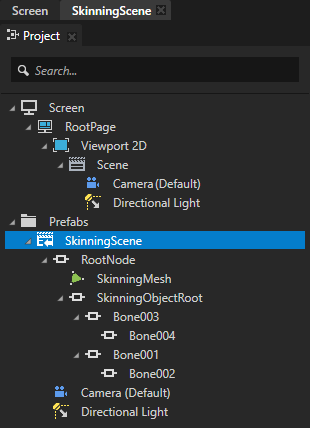
- In the Project > Prefabs a new Scene node named after the imported file. In that Scene node Kanzi Studio creates the scene hierarchy from the imported file and places the assets from the imported file into that prefab.
- In the Library Kanzi Studio places all resources from the imported file, such as Meshes, Splines, Animations, and Materials.

- In the Project > Prefabs select the Scene named after the 3D model you imported in the previous step and double-click it to open it as a composition.
To see the Scene composition rendered in the Preview, it must contain a camera and at least one light node.
The skinned mesh does not yet render correctly because it uses a default material which does not support skinning.
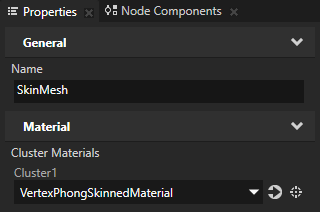
- In the Library > Meshes select the skinned mesh contained in the 3D model you imported in the first step and in the Properties set the Cluster Material property to a material that uses a material type which supports skinning.
For example, set the Cluster Material property to the VertexPhongSkinnedMaterial material. If your project does not contain the VertexPhongSkinnedMaterial, in the Library > Materials and Textures > Material Types press Alt and right-click, and select VertexPhongSkinned. Kanzi Studio adds to the Library the VertexPhongSkinned material type and the VertexPhongSkinnedMaterial material.
Tip To add to any Phong material type support for skinning, in the Library select the material type, and in the Properties in the Preprocessor Defines property set the Value of KANZI_SHADER_SKINNING_BONE_COUNT to the number of bones in your skinned mesh. See Modifying the default Phong material types.
The VertexPhongSkinned material type supports skinning of meshes with up to three bones by default.

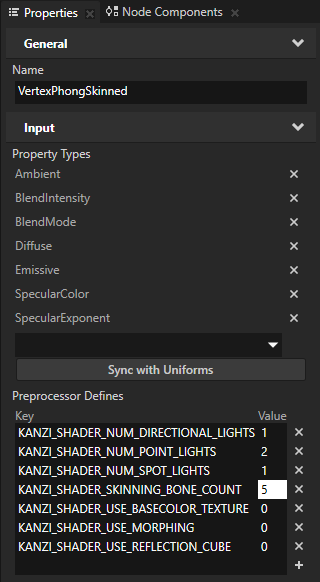
- (Optional) If your skinned mesh contains more than three bones, in the Library > Materials and Textures > Material Types select the material type you use to render your skinned mesh, and in the Properties in the Preprocessor Defines property set the Value of KANZI_SHADER_SKINNING_BONE_COUNT to the number of bones your skinned mesh contains.
For example, set the Value of KANZI_SHADER_SKINNING_BONE_COUNT to 5 and press the Enter key.
See also
3D content
Preparing 3D assets in third-party tools
Importing 3D content
Material types and materials
Using material types
Shaders
Editing shaders
Using meshes
Meshes best practices

Open topic with navigation